Power Apps: Controlled Data Entry
Power Apps can replace manual spreadsheets, email-based intake, and inconsistent data entry with structured applications that write directly into Azure SQL Database and other trusted enterprise systems.
- Controlled and managed data input into Azure SQL Database.
- Forms designed around business rules, required fields, validation, and approval logic.
- Dropdowns, combo boxes, date pickers, toggles, attachments, people fields, lookup fields, and dependent choices.
- Strong handling of text, numbers, dates, times, Boolean values, choices, currency, attachments, and relational IDs.
- Role-based screens so users only see the information and actions appropriate to them.
- Patch, submit, and update logic for reliable inserts and updates back to SQL tables.
- Audit-friendly patterns for who changed what, when, and why.
Power BI: Dashboards and Apps
Power BI turns operational and historical data into dashboards, reports, and applications that help leaders understand trends, performance, risk, and outcomes.
- Many dashboards organized into a single Power BI App for clean user access.
- Historical reporting across months, quarters, fiscal years, and operational periods.
- Executive dashboards, operational dashboards, drill-through pages, scorecards, and detailed reports.
- Trend analysis, KPIs, exception reporting, insights, and performance monitoring.
- Insights from Azure SQL, Dataverse, SharePoint, Excel, APIs, and other integrated sources.
- Security trimming using workspaces, app audiences, and row-level security where needed.
- Reports designed for decision-making, not just data display.
Power Automate: Premium Connectors, Triggers, Schedules, RPA, and Notifications
Power Automate connects systems and users through repeatable workflows, notifications, approvals, and data movement. Evolvement LLC designs flows that use premium connectors and secure integration patterns to automate real business processes.
- Premium connectors to Azure SQL Database for reads, inserts, updates, stored procedures, and governed enterprise workflows.
- Integration with Azure Machine Learning Studio and model outputs for automated predictions, scoring, and decision support.
- Microsoft Teams notifications, adaptive cards, approval messages, and operational alerts.
- Email alerts, status updates, escalation workflows, and exception handling.
- Scheduled, manual, event-based, HTTP/API, and data-change triggers.
- RPA and desktop flow patterns for automating systems that do not expose modern APIs.
- Automated movement of records between Power Apps, Azure SQL, SharePoint, Dataverse, APIs, Power BI, and reporting datasets.
- Logging and error-handling patterns so failed flows can be reviewed, corrected, and improved.
Interactive Examples and Learning Area
This page is ready for future embedded Power Apps, Power BI reports, workflow diagrams, screenshots, videos, SQL table examples, API examples, or downloadable templates.
The screenshots below are real Microsoft Power Platform examples and public product screenshots that show the types of apps, dashboards, triggers, schedules, and RPA workflows this page can teach visitors about.
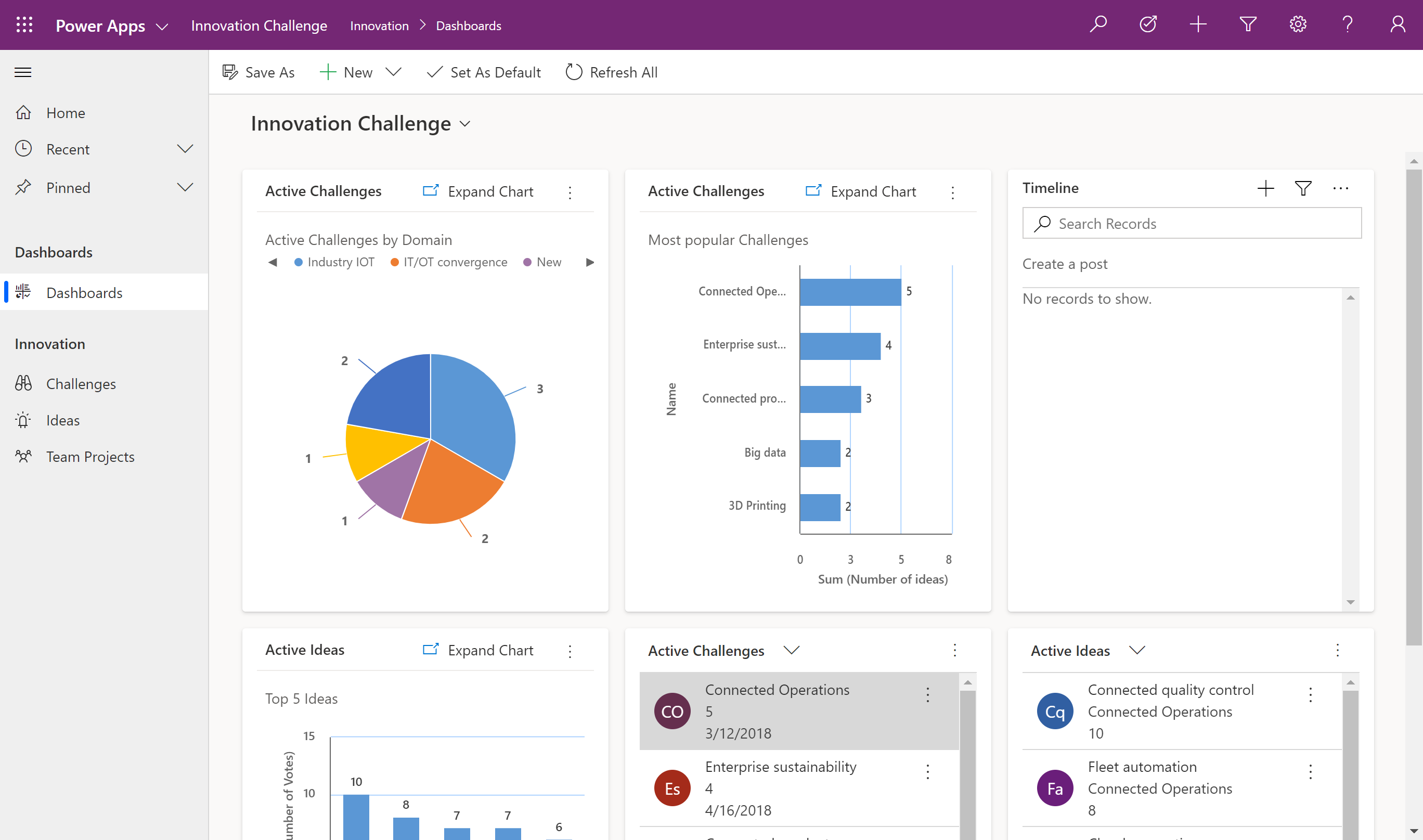
Power Apps: Model-Driven Business App
A data-dense Power Apps experience with dashboards, charts, views, records, and navigation across business tables. Source
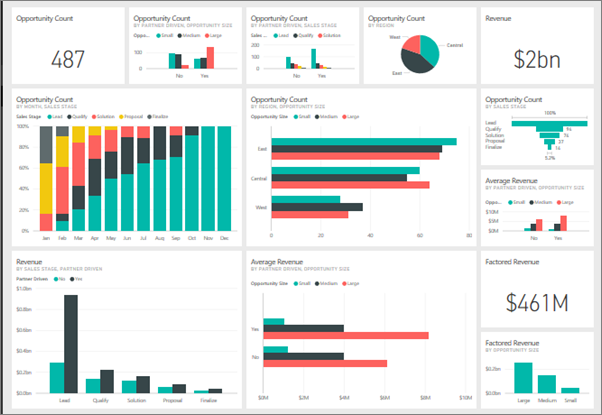
Power BI: Executive Dashboard
A sophisticated Power BI dashboard showing KPI tiles, revenue metrics, opportunity counts, charts, and high-level decision views. Source
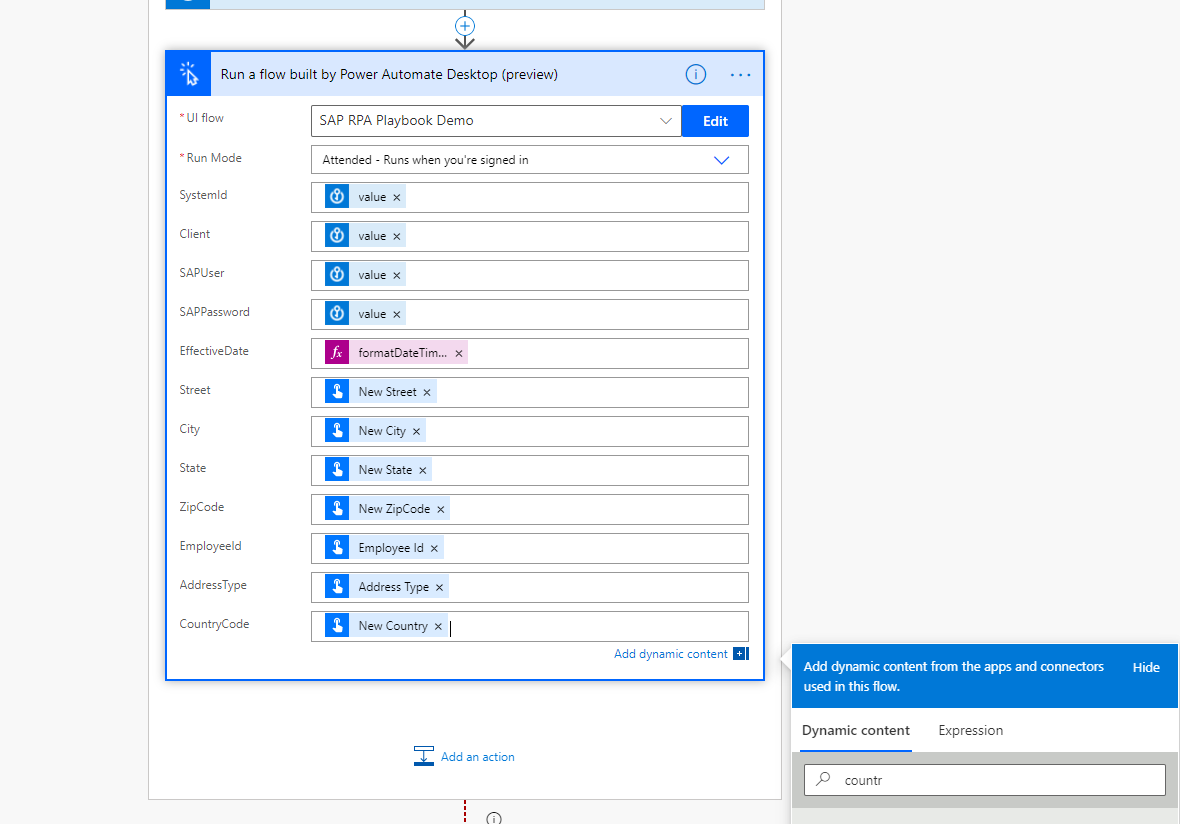
Power Automate: RPA Desktop Flow
Cloud flow calling a Power Automate Desktop RPA flow with dynamic variables, secrets, and system inputs. Source

Power Automate: Scheduled Trigger
A scheduled cloud flow pattern for recurring jobs, report distribution, backups, reminders, and operational automation. Source

Power Automate + Power BI: Automated Report Export
Example of Power Automate exporting a Power BI report, supporting scheduled reporting, historical reporting packages, and automated distribution. Source